
It’s a 40-degree arvo, the shopping is melting in the boot, and the garage door won’t budge however hard you press the remote. Or you’ve just got the keys to a new home in Baldivis, with two remotes for a family of four. Either way, you want it sorted today.
The good news is that programming a B&D garage door remote usually takes a few minutes, and no special tools are required, just a ladder. The catch? Roller and sectional B&D openers, both common across Australia, use different steps, and holding the wrong button too long can erase every remote you own.
This guide explains how to sync B&D garage door remote controls with your opener, from adding a remote to an existing garage door opener to erasing lost ones. Skip the videos and follow the steps for your opener type. At Slide & Glide, we’re a local, authorised B&D dealer in Osborne Park with the full range of B&D remotes in stock, so if you get stuck, we can help.
Before You Start
Run through these checks first. They’ll save you a few trips up the ladder:
- Know your opener type. Two doors can share a style and garage door colour yet need different steps, because the process is dependent on the opener. Roller door motors, for example, sit beside the drum, while sectional openers hang from the garage ceiling.
- Check the remote is compatible. Match your remote to the model number on the motor’s label. If the label has faded, send us a photo and we’ll identify the opener.
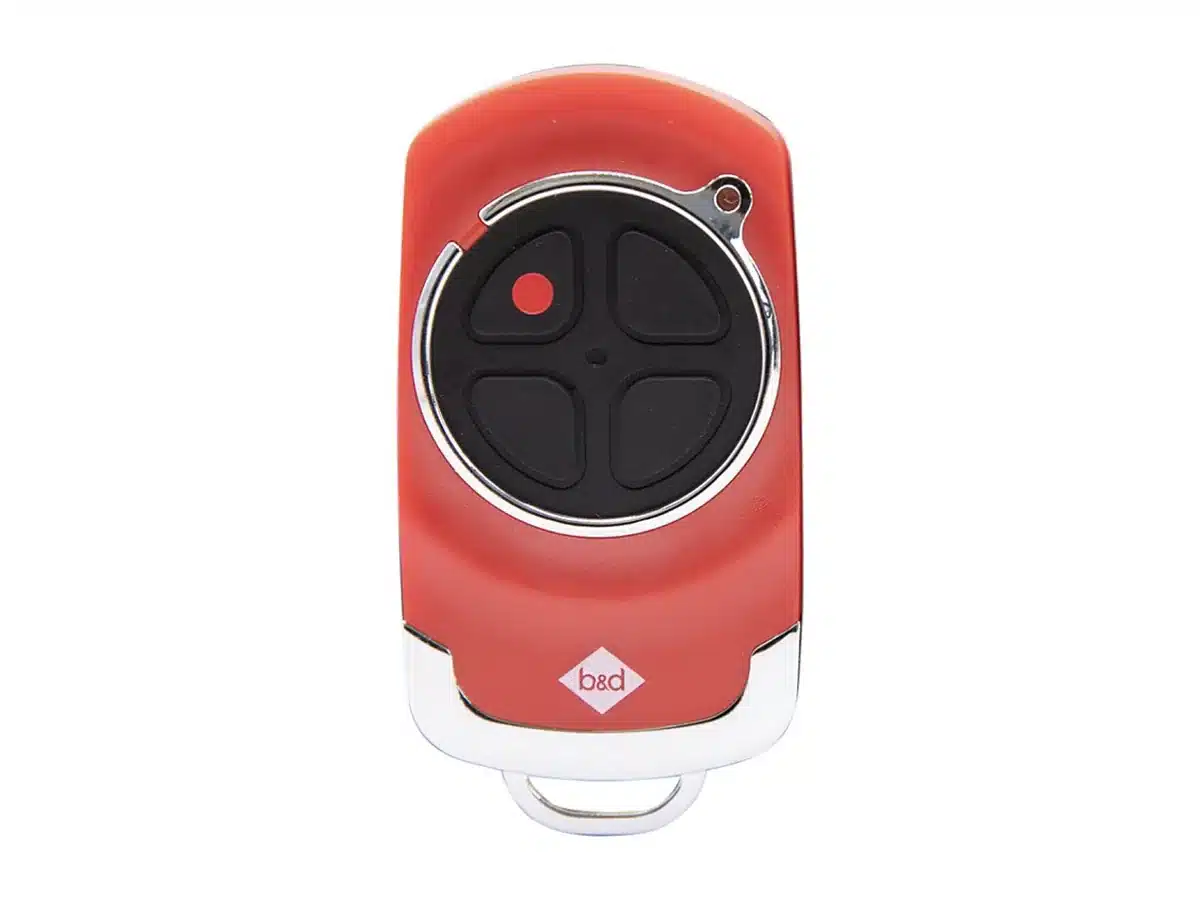
- Fit a fresh battery. Most B&D handheld remotes take a CR2032 battery, and a weak one can light the remote’s LED without sending a signal. A remote that lives in a hot car through a Perth summer drains faster.
- Check the power. Make sure the opener is plugged in and switched on.
- Grab a sturdy ladder, and a friendly helper to steady it if you can. Set the ladder up clear of the door’s path and climb down before every test.
Which B&D Remote Do You Have?
B&D has used a few remote systems over the years, and your opener’s system decides which remotes will work:
- Tri-Tran+: the current rolling code technology, which encrypts the signal and generates a new access code every time you press a button.
- Tri-Tran: the previous generation of B&D rolling code remotes.
- DIP switch: older fixed-code remotes with a row of small switches inside that must match the opener.
Rolling codes are a big step up for your garage door security, but Tri-Tran+ remotes aren’t backward compatible with DIP switch openers, so a new remote won’t upgrade an old fixed-code system. If in doubt, check the model numbers on the motor and remote before you purchase, or contact us to find the right match.
How To Program A Remote To A B&D Roller Door Opener
B&D roller door openers learn new remotes through a CODE SET button on the control panel:
- Open the controls cover. Remove the clear plastic cover on the front of the opener.
- Press CODE SET. Press and hold the CODE SET button for two seconds, then release. Keep it brief, because long presses on the motor’s buttons can erase the remotes already stored.
- Press the remote button. Hold the button you want to use for three seconds, then release. On many models you’ll see the opener flash and hear a beep as it learns the code.
- Repeat to confirm. Press and hold the same remote button for another three seconds, then release. The second press confirms the code is saved.
- Refit the cover and test. Climb down, move the ladder clear, then press the remote and watch the moving door. If it rolls up, congratulations: that remote is done.
Repeat for every remote and button you want to use.
How To Program A Remote To A B&D Sectional Door Opener
Sectional openers work differently, using MODE and the opener’s CLOSE button:
- Remove the controls cover on the back of the opener.
- Select remote mode. Press MODE repeatedly until the remote LED lights up.
- Hold CLOSE. Press and hold the blue CLOSE button, marked with a large down arrow.
- Press the remote button. While holding CLOSE, press and hold your chosen remote button for three seconds, then release.
- Repeat. Still holding CLOSE, press and hold the same remote button for three seconds again, then release.
- Finish. Let go of CLOSE, press MODE once to finish, then refit the cover.
- Test the remote from a safe distance to ensure the door opens and closes properly.
Button names can differ depending on the model, so if your opener looks different, check its manual first. Our library of garage door motor manuals is a good place to look.
How To Program A B&D Wall Remote
A wall remote is a button mounted inside the garage or house that works like a handheld remote. Unlike the kids’ remotes, it can’t be lost in the car or left at footy training, so it makes a handy backup. On B&D sectional openers, you program it exactly like a handheld remote, using the sectional steps above.
Adding A Remote With One That Already Works
Many newer B&D openers also let you code a new remote with a working one, so there’s no climbing up to the motor. It involves a small coding button pressed with a ballpoint pen, and the sequence varies, so follow your model’s instructions.
How To Erase All Remotes From A B&D Opener
If a remote is lost or stolen, or you’ve moved into a new home, erase the opener’s memory so old remotes can’t open your garage. Until you do, your property is exposed to anyone holding one: previous owners, past tenants or, in a new Ellenbrook build, the tradies who had a remote during construction. Erasing clears every remote at once, so each one you keep must be reprogrammed afterwards.
- Sectional openers: remove the cover, press MODE until the remote LED is lit, then press and hold MODE for about 10 seconds until the opener stops flashing. Press MODE again to finish, and all remotes are erased.
- Roller openers: the CODE SET (programming) button is also used to erase stored remotes. Check your model’s manual for the exact steps first.
Then reprogram the remotes you’re keeping and test each one. A fresh start can also clear conflicts when an opener has collected too many remotes over the years. Our guide on how to re-code your garage opener covers what else to do after a remote goes missing.
Why Your B&D Remote Isn’t Working
If the door won’t respond, work through these checks before you replace anything:
- Replace the battery first. Battery issues are among the most common causes of remote failure, so fit a new one every 12 to 18 months.
- Watch the LED. If it lights but nothing happens, the battery may be too weak to transmit, or the remote may not be programmed to that opener.
- Check the range. Perth openers and garage remotes typically use a radio frequency of 433MHz, and interference from a nearby device can reduce the range. Try again closer to the door.
- Check the opener. Make sure it has power and responds to the wall button. If you hear a click but the door doesn’t move, the fault is likely in the opener, not the remote.
- Check the safety beams. If the door starts to close and then reverses, look for an obstruction or a misaligned safety beam. Beam alignment is a common call-out for our team.
Sometimes the remote isn’t the problem at all. On a job in Thornlie, one DIP switch on a 25-year-old B&D opener had cracked and sat between positions, so no code would ever match. Our technicians carry receiver boards on every call-out, and a new board fixed it in under an hour.
Still stuck? Turn to our guide to a garage remote control not working for more fixes. If the motor itself isn’t responding, our garage door motor repairs team can inspect it and fix the fault.
Adding Smart Control For Extra Convenience
Ever been halfway down the Kwinana Freeway and wondered whether you shut the garage? Many newer B&D openers can be run from your phone, so you can check it’s shut, open or close it from the car and give family members access without extra remotes. Some smart models have this built in, while older openers may need an add-on device. If your motor is getting on, our range of B&D garage door openers includes smart options.
Buying A Replacement B&D Remote
Match a replacement to your opener’s brand and model, not the price tag. Cheap unbranded copies may not work with B&D’s rolling codes. Every remote we sell is a genuine product from the manufacturer, and our vans carry them, so we can often supply and program one on site or post one the same day. Browse our garage door remote controls before you buy.
Frequently Asked Questions
Quick answers to common questions about B&D remotes.
Can I Program A B&D Remote Without The Original?
Yes. You only need access to the buttons on the opener, and the new remote is stored alongside the others. If the original was lost or stolen, erase the opener’s memory first.
Do I Need To Reprogram My Remote After Changing The Battery?
No. Changing the battery doesn’t erase the code, so the remote should work straight away. If it doesn’t, check the battery is the right way round.
How Long Does It Take To Program A B&D Remote?
Usually less than five minutes per remote, once you’ve found the right buttons on the opener.
Can Someone Copy My B&D Remote?
Tri-Tran+ remotes use rolling codes, so the code changes with every press, making them very hard to copy. Older fixed-code DIP switch remotes are far easier to copy, which is a good reason to upgrade to a rolling code opener.
Get Your B&D Remote Working Today
Programming a B&D remote is simple once you know which opener you have: CODE SET for roller openers, and MODE and CLOSE for sectional openers. Follow the hold times exactly, test every remote, and erase the memory whenever a remote goes missing or you move house. Do that, and the next 40-degree arvo ends with the door opening on the first press.
If a remote won’t pair or you’d rather hand the job over, our technicians cover Perth from Joondalup to Mandurah and can supply and program compatible B&D remotes on site. Contact our team or call 0489 266 468 to book.

- How To Tension A Roller Door (And When To Call A Pro) - October 18, 2026
- How To Program A B&D Garage Door Remote - October 18, 2026
- How Long Do Garage Doors, Motors And Springs Last? - October 18, 2026

Social Media